
Someone still decides who gets each lead
Without routing rules in the system, a person picks each new lead's owner. They read the region, the source and the budget, then choose a team.
When the rules live in someone's head or a spreadsheet, routing depends on that person. Automate each rule as its own flow, and every new rule means one more flow to build.
Lead Routing Agent keeps the rules in one table. One flow reads them for each lead, and an AI prompt picks the team.
Your rules, applied to each new lead
Lead Routing Agent runs on Dynamics 365 Sales, Dataverse and Power Automate, under your own Microsoft licences. Below is what it does:
Rules live in one table
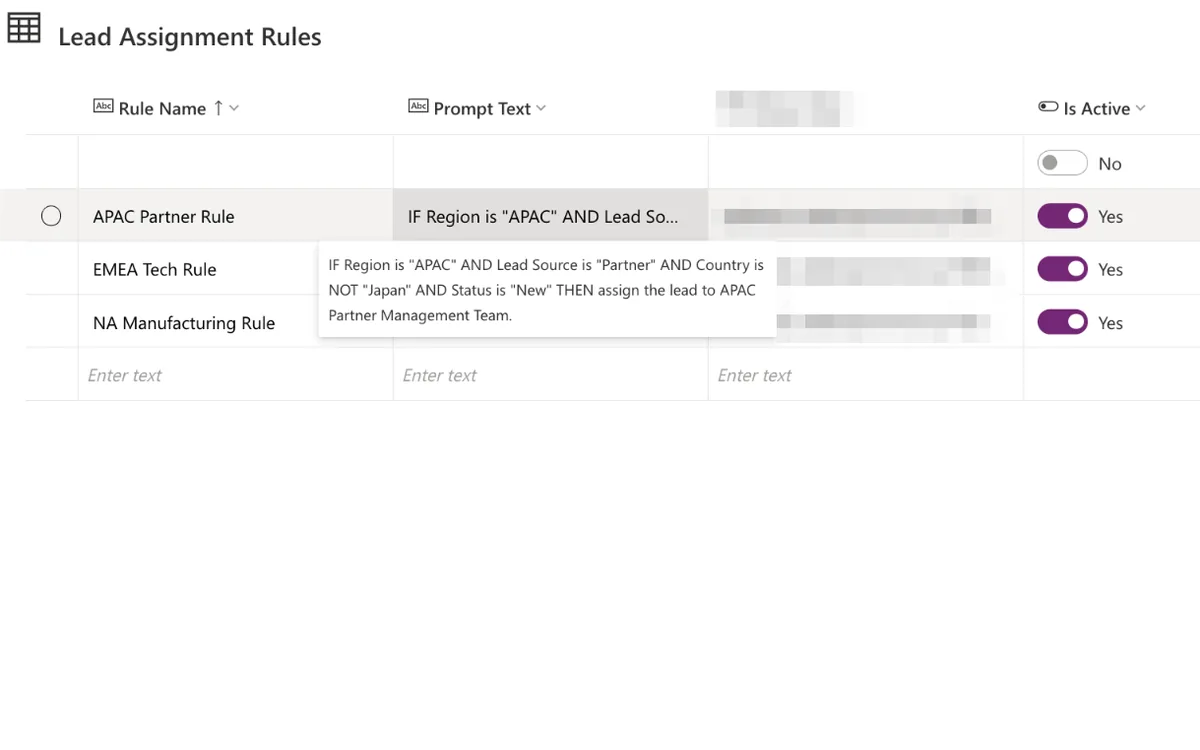
Each rule is a row in the Lead Assignment Rules table: a name, a condition and an Active switch. You change a rule by editing its row.
Conditions are plain text
Write each condition as plain text. For example: IF Region is APAC AND Lead Source is Partner AND Country is NOT Japan AND Status is New, THEN assign the lead to the APAC Partner Management Team.
An AI prompt picks the team
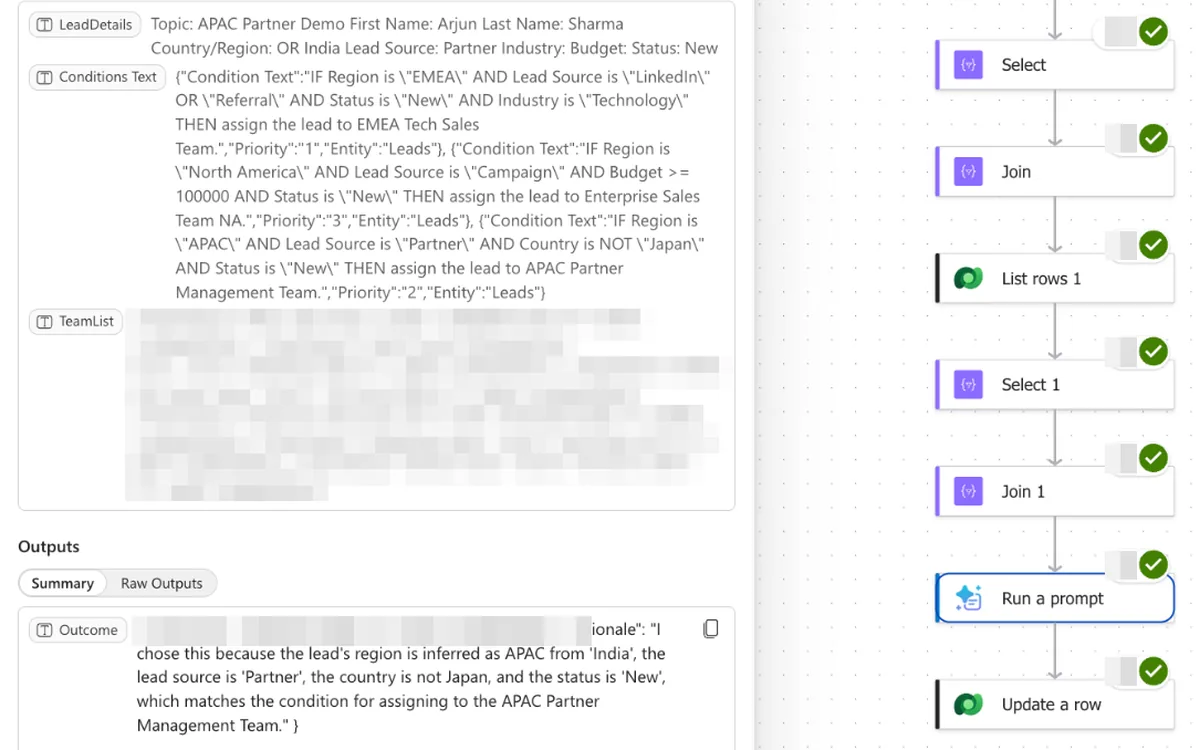
The flow passes the lead, the active rules and your teams to an AI prompt. It returns the team whose rule the lead matches, with a short reason.
The team becomes the owner
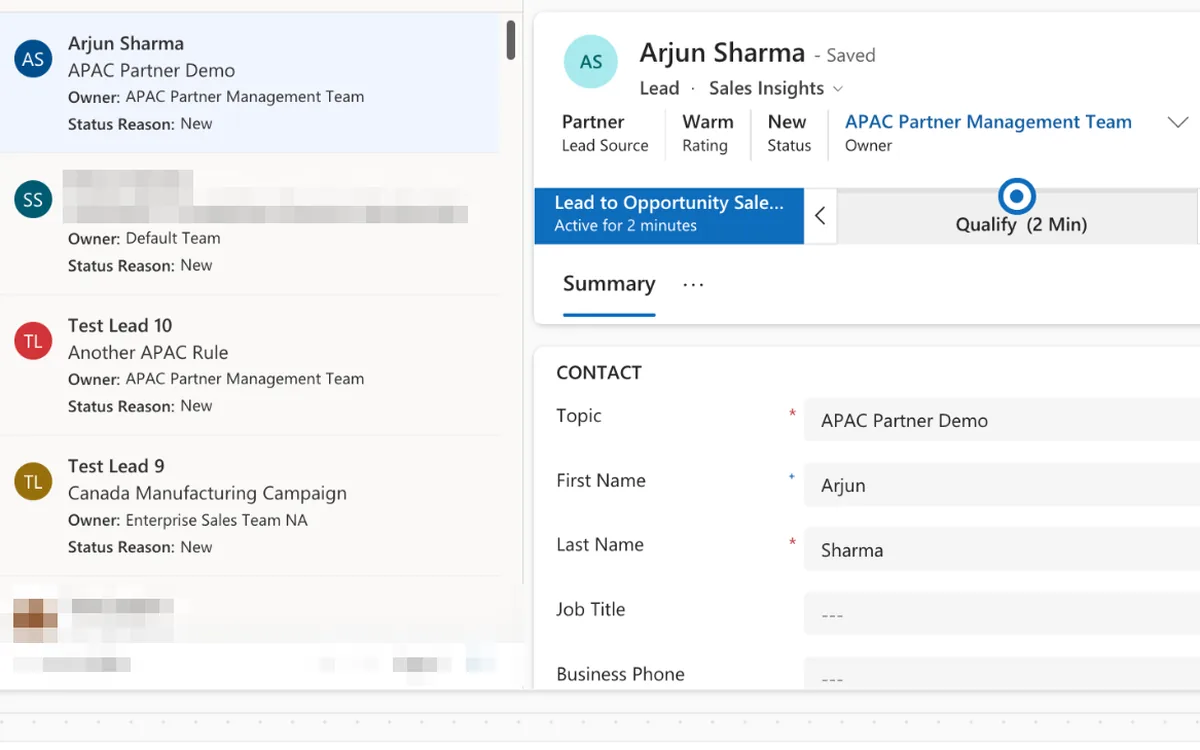
The flow sets that team as the lead's owner. Nobody has to pick the owner by hand. In the Leads view, you see which team owns each lead.
One demo lead, from rule to owner
The Lead Assignment Rules table
The rules sit in a Dataverse table. This demo has three: partner leads in APAC, technology leads in EMEA, and North America campaign leads with a budget of 100,000 or more. Each one is switched on and applies to Leads.
- One row per rule
- Conditions written as plain text
The AI prompt's decision
A demo partner lead from India came in. The flow sent it to the AI prompt with all three rules and the team list. The prompt chose the APAC Partner Management Team and wrote down why.
- The lead, rules and teams go in
- A team and its reason come out
The new owner on the lead
The flow then updated the lead. Its owner is now the APAC Partner Management Team. In the Leads view, two other demo leads show the teams their rules chose.
- Owner set by the flow
- Each lead's team visible in the Leads view
Five steps, from new lead to new rule
A lead is created or updated
A new lead is saved in Dynamics 365, or an existing lead changes. That starts the Power Automate flow.
The rules are read
The flow reads the active rules from the Lead Assignment Rules table. It also reads the list of your teams.
The AI prompt decides
The lead's details, the rules and the teams go to an AI prompt. It matches the lead to a rule and returns that rule's team.
The owner is updated
The flow sets the chosen team as the lead's owner. You can read the prompt's reason in the flow's run history.
You change rules in the table
For a new region, team or budget threshold, add or edit a row in the table. The same flow reads it for the next lead.
Lead Routing Agent, answered.
Built for teams that route leads by rule
Sales operations
You own the routing rules. Keep them in one table, not in one person's memory.
Dynamics 365 admins
One flow serves every rule. A new rule is a new row in the table, not a new flow to build.
Regional sales teams
Rules can use region, source, industry or budget. A lead goes to the team whose rule it matches.