
Who gets the record should not wait on a ticket
Leads, opportunities and quotes arrive in Salesforce every day. Someone has to decide who gets each one.
One rep ends up overloaded while another waits for work. Some records go to people who are off shift or on leave. Records sit waiting, and so do your customers.
Fixing it is slow. Even a small rule change becomes a ticket, and a wait for an Admin or the tech team.
Set the rule once, with no code
Here is what you set up:
Choose the object
Pick a supported Salesforce object, such as Leads, Accounts, Contacts, Opportunities, Quotes or Cases.
Set conditions
Build conditions on record fields, including supported related objects. Combine them with AND logic.
Pick recipients
Send records to users, queues or public groups, whichever fits the rule.
Use round robin
Records are shared in turn, one person after the next. It is built to spread work across the team, not pile it on one rep.
Cap assignments
Give each recipient a maximum assignment limit. It helps prevent excessive workload.
Skip absent users
Mark someone Out of Office and they are skipped. Untick it and they are back in the rotation.
Assign by shift
Create shifts and see who is available, and when. Records go to eligible people on shift.
Pick when it runs
Assign the moment a record meets the conditions. Or run a scheduled batch, or run it on demand.
Notify the owner
Set follow-up actions, such as notifying the new record owner.
See who got what, and change it
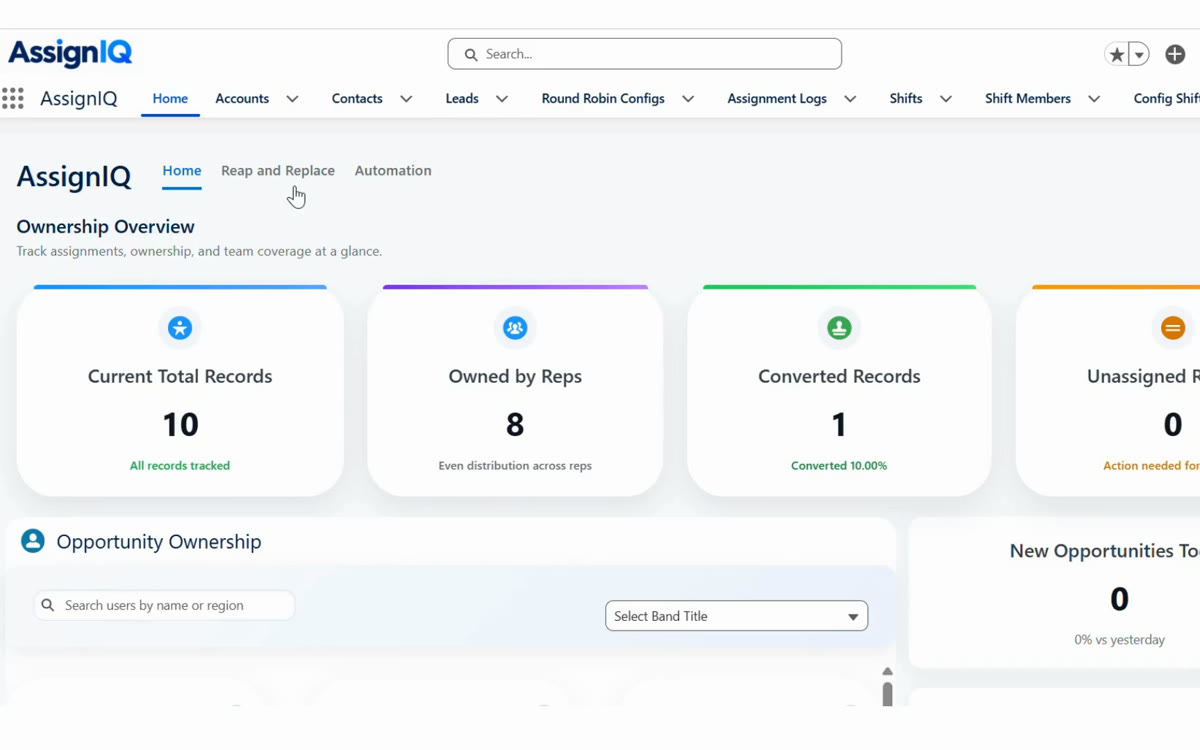
The Home tab
One overview shows record distribution, ownership, unassigned records, team availability and workload. You see how work is spread before you change a rule.
- Ownership and workload at a glance
- Unassigned records and team availability
Assignment Logs
Each assignment is logged. The log shows the record, the person, the time and the result. When someone asks where a record went, and when, the answer is there.
- Record, person, time and result
- A history you can check
Manual take
A rep with free time can take ownership of unassigned records themselves. No one has to hand them over.
- Reps take unassigned records
- No hand-over request needed
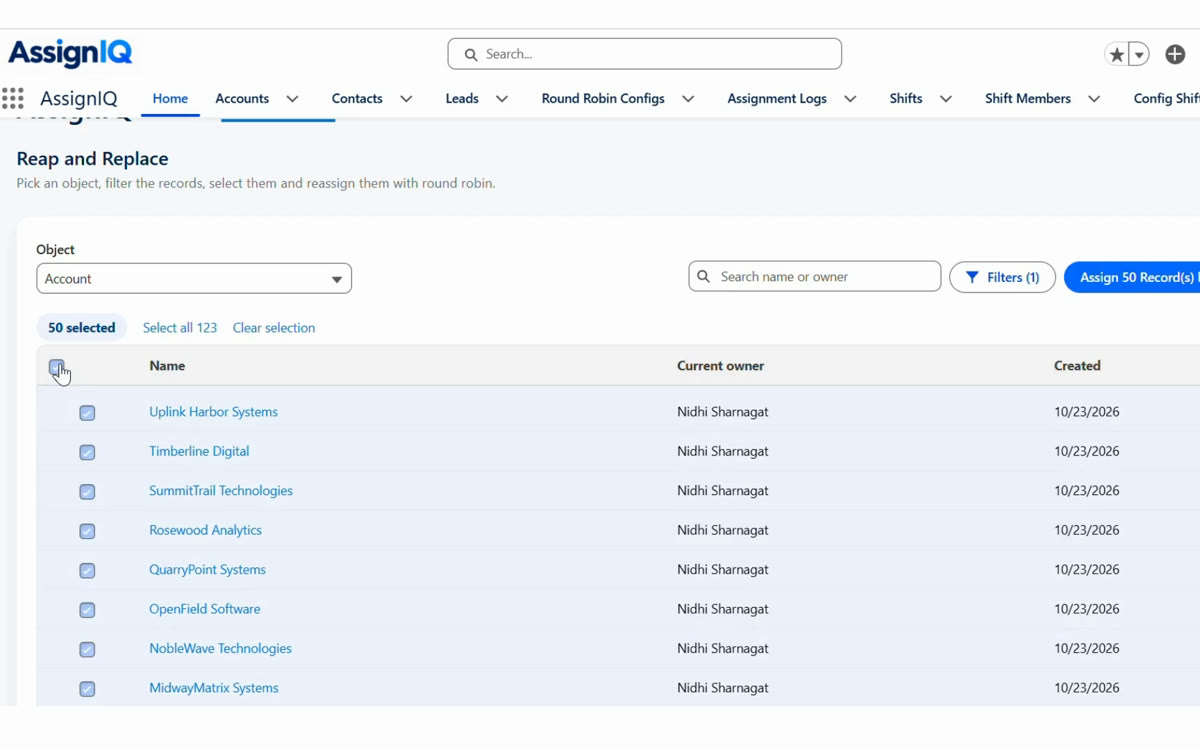
Reap and Replace
Reap and Replace has its own tab. It identifies eligible inactive records and manages their replacement, based on the target record levels set for each owner. Pick an object, filter the records, select them and reassign them in round-robin order.
- Target record levels for each owner
- Reassign the selection in round robin
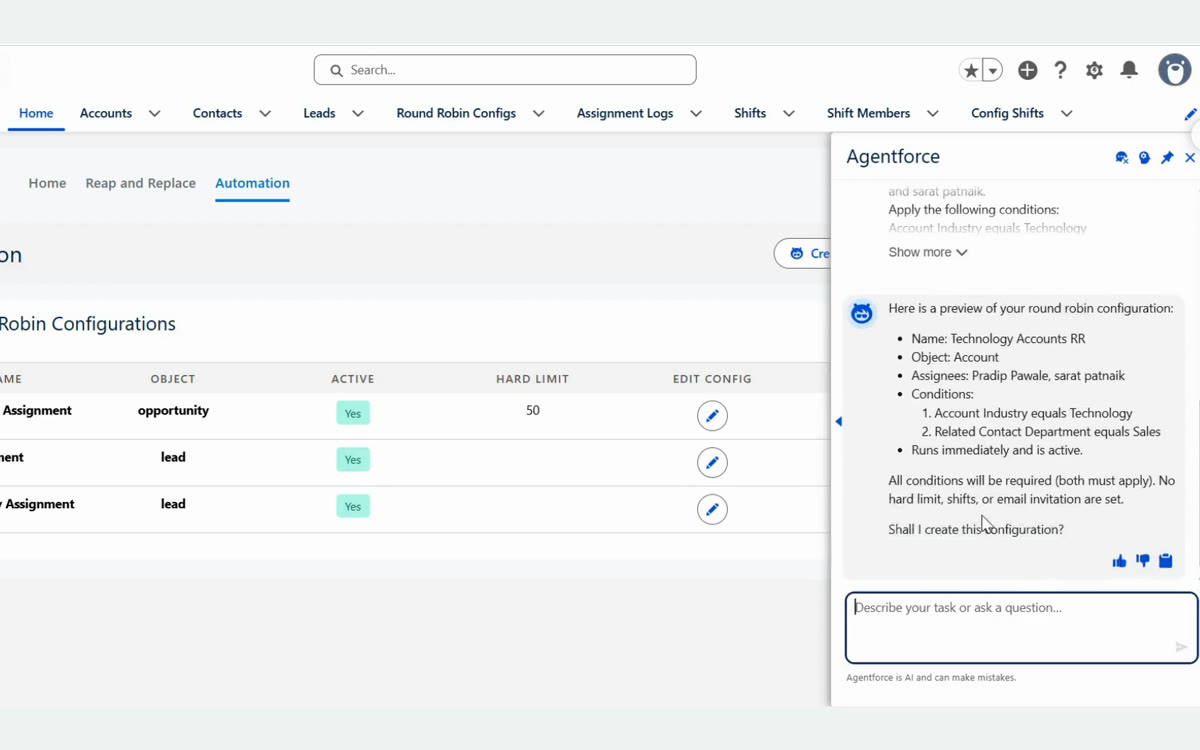
Create with AI
AssignIQ has AI features. Create with AI opens Salesforce's Agentforce panel, and you describe the rule in plain words. Agentforce is Salesforce's AI, and its own panel says so: "Agentforce is AI and can make mistakes." That is why you review the preview and confirm before the rule is created.
- Uses Salesforce Agentforce
- You review the preview, then confirm
From rule to logged assignment
Set the rule
Choose the object, the conditions and the recipients in AssignIQ's screens. No code to write.
Match a record
A record meets the rule's conditions, a scheduled batch starts, or you run the rule on demand. No matching rule means no action.
Check availability
AssignIQ checks shifts, Out of Office status and each recipient's assignment limit. Anyone off shift or away is passed over for the next eligible person.
Share it in turn
The record goes to the next eligible user, queue or public group, in round-robin order.
Log and notify
Each assignment goes into Assignment Logs. The new owner can be notified.
Clients we've worked with
AssignIQ is built by our own CRM team. Here are two of the clients we've worked with.


AssignIQ, answered.
Built for the teams that run assignments
RevOps and sales heads
You own the targets. Round robin is built to spread records across the team, not pile them on one rep.
Salesforce Admins
Routine assignment changes no longer need a ticket to you. Authorised business users make them, with no code.
Teams that work shifts
Records go to people who are on shift and available. Anyone off shift or away is passed over for the next eligible person.